



See additional notes on installation below.
Compatibility:
Windows 10, Windows 8.1, Windows 8, Windows 7, Windows Vista, (32 and 64-bit versions)
Windows Server 2008, Windows XP, Windows Home Server, and Windows 2003 Server
Not Compatible: We are sorry to all Apple, Linux and other device users. We have no plans to make ComputerTime work on any other platforms at this time. We also do not have knowledge or recommendations for other products for those platforms.
Free 14-day Trial: ComputerTime will be fully functional for 14-days so that you can try out the software. You can purchase ComputerTime after you’ve tried and and decide it’s the right solution for your family.
If you choose to purchase ComputerTime, no other download is required. You will simply activate your copy and can use the product indefinitely.
Installation Notes
When you download the setup file, you may get a message that looks like this:
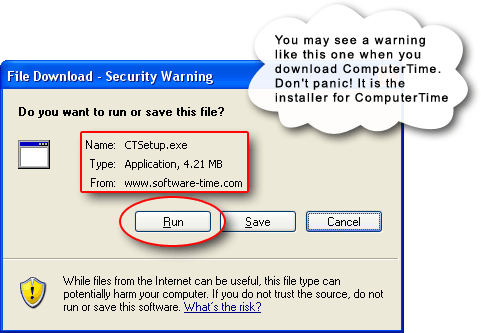
Most browsers will give you a chance to run or save the ComputerTIme setup file. You can click Run to immediate go into the installation process on your machine, or you can click save the file so that you can install it on multiple computers in your house without having to download it again.
If you’ve purchased ComputerTime and are reinstalling it or adding it to a new computer (because you purchased the Family Pack Add-On which lets you install it on all of the computers in your home), then you will install the same download above on each computer. It will initially present you with the trial window telling you that you have 14-days left, but you can click on the Activate button and enter your product key which you received when you completed your purchase online. It normally looks something like PK-AA99-AA99-JY.