Is it something simple like you lost your Product Key?
Try This First
If you are having problems, you may be able to resolve the issue by using
one of the following suggestions or resources:
- Reboot the computer and see if that solves the problem.
- Update to the latest version of ComputerTime.
- Update your anti-virus software and run a complete scan.
- Frequently Asked Questions (FAQs)
Contacting Support
Submit Request Using ComputerTime Admin
(Recommended)
This method allows ComputerTime to also upload log files and basic system information which may help us diagnose whatever trouble you might be having.
- Open ComputerTime Admin and on the Help menu select Customer Support.
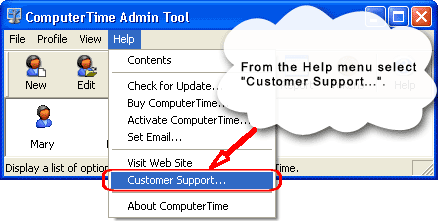
The Customer Support… menu is in the ComputerTime Admin application. You can find it on the Help menu. Don’t confuse this with the Question Mark icon on the toolbar. The icon will just bring up the local help file.
- On the Customer Support dialog, click the Request Help button.
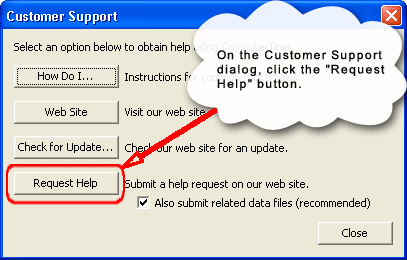
If you need to request help, this is the button to press. If it is just a question, you can uncheck the box that says “Also submit related data files”, but if you are having trouble with some function of the software that you think is not working as it should, it is best to leave that checked.
- Fill out the support form that appears. Be sure to enter a
descriptive Subject and provide as much detail as possible in the
Description.
Email Us
Simply send an email to support@softwaretime.com, and we will respond.